


Digital Signage for Schools: K-12 & Beyond
Blogpost was published on May 29, 2024
Digital signage in schools, like in many industries, is revolutionary. It is truly transforming the educational environment, offering dynamic and engaging platforms to inform, entertain, and connect with students, staff, and visitors. Today, we'll explore the benefits of digital signage for schools, the features of Play Digital Signage that can help you get started, and a step-by-step guide on how to implement digital signage in your educational institution.
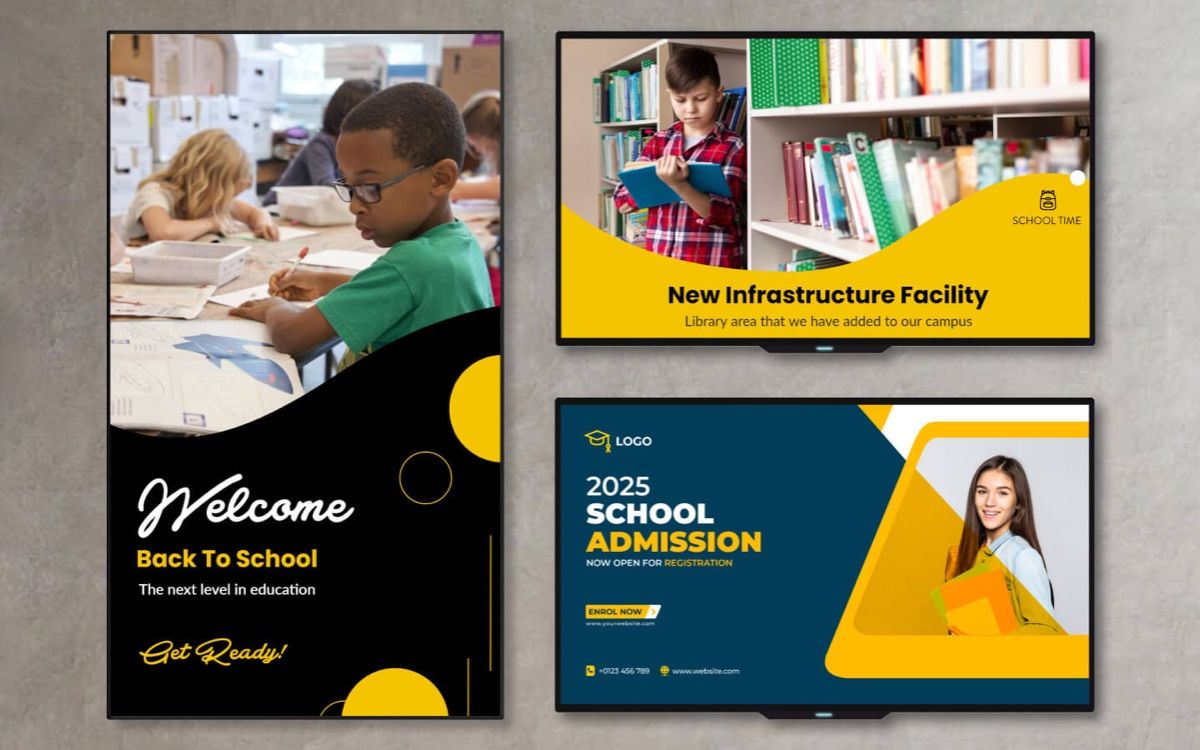
Digital Signage Benefits in Schools
There are several benefits of implementing digital signage in any educational institution. Here are a few.
Improved Communication
Digital signage provides a modern and effective way to communicate important information such as announcements, schedules, upcoming events, and safety procedures. With eye-catching displays and dynamic content, schools can capture attention and ensure messages are seen and understood.
Enhanced Engagement
Interactive digital signage encourages student engagement by offering interactive elements such as quizzes, surveys, and news feeds. This interactive approach promotes active participation and creates a more immersive learning environment.
Visual Learning Opportunities
Digital signage can be used to showcase educational content, multimedia resources, and student projects. Visual learning opportunities enhance curriculum delivery, reinforce key concepts, and spark curiosity among students.
Emergency Notifications
In times of emergencies, digital signage can be a vital communication tool for disseminating critical information, instructions, and safety protocols to students, staff, and parents. When you have digital signage screens throughout campus, you can use tags to instantly deliver notifications and important instructions to everyone simultaneously and silently if necessary (something an overhead announcement cannot do).
Branding and School Spirit
Customizable digital signage allows schools to showcase their branding, achievements, and school spirit. From digital bulletin boards to live event streaming, digital signage fosters a sense of community and pride among students, visitors, staff, and parents alike.
Content Ideas and Considerations for Digital Signage in Schools
Now that you see the benefits of digital signage in schools, let’s talk about some content inspiration and a few considerations when thinking about educational digital signage content.
Content Ideas
Digital signage content is only limited by your imagination, but here are some ideas to get you started.
Announcements and News
Share important announcements such as upcoming events, school holidays, and deadlines. Include news updates relevant to the school community, such as achievements, sports results, and student spotlights.
Event Promotion
Promote school events such as assemblies, performances, fundraisers, and parent-teacher meetings. Use dynamic content like event posters, countdowns, and teaser videos to generate excitement and attendance.
Educational Content
Utilize digital signage to deliver educational content and resources. Display daily trivia questions, educational videos, book recommendations, and historical facts to engage students and promote learning outside the classroom.
Safety and Emergency Information
Ensure digital signage includes safety information and emergency protocols. Display evacuation routes, weather alerts, lockdown procedures, and contact information for school security and emergency services.
Cafeteria Menus
Showcase daily or weekly cafeteria menus, special meal options, nutritional information, and allergy alerts. Include interactive features like feedback surveys and polls to gather student preferences.
Student Achievements
Highlight student achievements such as academic awards, sports accomplishments, art showcases, and community service projects. Recognize students' efforts and contributions to foster a positive school culture.
Digital Bulletin Boards
Create digital bulletin boards for specific departments or clubs, including announcements, meeting schedules, and upcoming activities. Encourage student involvement and participation in extracurricular programs.
Interactive Quizzes and Polls
Engage students with interactive quizzes, polls, and surveys displayed on digital signage. Gather feedback on school initiatives, student preferences, and community interests to inform decision-making.
Virtual Tours and Campus Maps
Offer virtual tours of the school campus, facilities, and amenities using digital signage. Include interactive campus maps, directions to classrooms, and information about key locations for visitors and new students.
Health and Wellness Tips
Promote health and wellness initiatives with tips, reminders, and resources on physical activity, nutrition, mental health, and stress management. Encourage healthy habits among students and staff.
Community Engagement
Foster community engagement by featuring local news, community events, volunteer opportunities, and partnerships with businesses and organizations. Showcase the school's involvement and contributions to the community.
Content Considerations
When designing and choosing your digital signage, ensure you keep these considerations in mind.
Relevance and Timeliness
Ensure content is relevant, timely, and aligned with school activities, academic calendars, and community events. Update content regularly to keep information current and engaging.
Accessibility and Inclusivity
Design content that is accessible and inclusive for all students, staff, and visitors. Use clear fonts, high-contrast colors, and multimedia elements that accommodate diverse audiences, including those with visual or hearing impairments.
Consistency and Branding
Maintain consistency in branding, messaging, and visual elements across all digital signage displays. Use school colors, logos, and fonts to reinforce brand identity and create a cohesive experience.
Features of Play Digital Signage for Schools
Play Digital Signage is a cloud-based digital signage management software with a built-in content editor that has some amazing features for digital signage in the education space.User-Friendly Interface
Play Digital Signage offers an intuitive and user-friendly interface, making it easy for school administrators, teachers, and staff to create and manage content. No technical expertise is required, allowing schools to focus on delivering engaging messages.
Content Templates and Widgets
The platform provides a wide range of customizable templates and widgets specifically designed for educational institutions. From event calendars and school news tickers to weather updates and cafeteria menus, Play Digital Signage offers versatile content options that require minimal effort to get going.
Multi-Screen Support
Play Digital Signage supports multi-screen setups and screens of any size, allowing schools to display content across multiple locations such as classrooms, hallways, cafeterias, and outdoor areas. Centralized management ensures consistent messaging and branding.
Scheduling and Playback Control
Schools can schedule content playback based on time, day, and location using Play Digital Signage's scheduling tools. This flexibility enables targeted messaging and ensures relevant content is displayed at the right time.
Cloud-Based Management
With cloud-based management, schools can remotely access and control digital signage content from any device with an internet connection. Updates, changes, and monitoring can be done in real-time, simplifying content management.
Getting Started with Digital Signage in Schools
There are seven simple steps to getting started with digital signage in schools and we are here to lay it all out for you.
Step 1: Identify Objectives and Audience
Define your goals for implementing digital signage in your school, whether it's improving communication, enhancing learning experiences, or promoting school events. Identify your target audience, including students, faculty, parents, and visitors.
Step 2: Choose Display Locations
Determine the optimal locations for digital signage displays based on audience traffic, visibility, and communication needs. Common locations include entrance areas, hallways, cafeterias, libraries, and outdoor spaces.
Step 3: Select Hardware and Displays
Choose suitable hardware and displays for your digital signage setup, considering factors such as screen size, resolution, durability, and connectivity. Play Digital Signage is compatible with a wide range of hardware options, including digital displays, media players, and interactive touchscreens.
Step 4: Sign Up for Play Digital Signage
Visit the Play Digital Signage website and sign up for an account. Choose the number of screens that meet your school's needs, whether it's a single display or a network of screens across multiple locations. And don’t worry, you’ll never pay a dime until you’re ready to go live.
Step 5: Create and Manage Content
Use Play Digital Signage's intuitive interface to create engaging content for your digital signage displays. Customize templates, add multimedia elements, and schedule content playback according to your school's schedule and events.
Step 6: Deploy and Monitor
Deploy your digital signage displays in chosen locations and ensure they are properly configured and connected to the internet. Monitor content playback, audience engagement, and performance metrics using Play Digital Signage's monitoring and analytics tools.
Step 7: Evaluate and Optimize
Regularly evaluate the effectiveness of your digital signage strategy by gathering feedback, analyzing engagement metrics, and assessing the impact on communication and learning outcomes. Optimize content and strategies based on insights to continuously improve the digital signage experience in your school.
Easy Digital Signage Solutions for Education Campus Alerts and Branding with Touch Screens
School administrators, university IT teams, and educators often look for easy digital signage solutions for education campus alerts and branding with touch screens — because campuses need fast, reliable ways to share critical information while reinforcing school identity, all without complicated software or design skills.
PlaySignage delivers exactly that: a cloud-based platform that lets anyone create professional campus displays in minutes using drag-and-drop templates, pre-built zones, and built-in stock libraries. No graphic designers or IT specialists required.
Key Applications for Education Campuses
- Campus Alerts & Emergency Notifications: Publish real-time alerts, weather updates, event cancellations, or safety messages instantly across multiple screens. Use scheduling and tags so critical alerts override regular content automatically.
- Branding & School Spirit: Showcase your school logo, colors, motto, student achievements, and upcoming events in consistent, eye-catching layouts. Zones make it easy to combine branding with dynamic information on the same screen.
- Interactive Touch Screens: Turn standard displays into engaging touch experiences for wayfinding, virtual campus tours, interactive directories, event sign-ups, or student feedback kiosks. Students and visitors can navigate menus or explore resources directly on the screen.
Why These Solutions Feel So Easy
- Start with ready-made education-focused templates and customize with your own photos, videos, or text in the intuitive editor.
- Manage everything remotely from one dashboard — update alerts or branding across an entire campus or specific buildings without visiting each screen.
- Content syncs reliably with offline caching, so displays keep running even during network hiccups.
- Add plugins for RSS news, social media, or calendars to keep information fresh automatically.
For example, a university could have lobby touch screens showing an interactive campus map (one zone), live event alerts (another zone), and rotating branding slides with student success stories — all updated centrally in seconds.
This combination of simplicity, flexibility, and powerful features helps schools reduce printed materials, improve communication speed, and create a more modern, engaging environment for students, staff, and visitors.
Ready to bring easy, effective digital signage to your campus? Sign up for your free PlaySignage account today (no credit card needed) and start building your first education playlist with alerts and branding in under 15 minutes. Many K-12 schools and universities are already using these tools to transform how they communicate.
Featured Blog Posts
Start with our latest and most-read blog posts.
If you’re using Samsung Banner CMS for your LED signs, you’ve likely heard the news: Samsung is shutting down the service. Many users are now looking for a stable, affordable, and future-proof alt...
Learn More >
Red Metal Motors: Igniting Scholarships with Custom Classic Thrills
Okay, picture a shiny red truck rumbling through a parade, with Swoop the mascot waving from the back, drawing smiles and waves f...
Learn More >
Why We Built Our Community (and Why You’ll Love It Too)
At Play Digital Signage, we believe that powerful software isn’t just about slick visuals or cutting-edge features. It’s about connection – ...
Learn More >


Need more information about digital signage?
If you haven’t found what you were looking for here, we still have lots to show you! Check out sample digital signage solutions by industry to see how digital signage fits into your business, case studies from those who have come before you to see how they have taken advantage of digital signage, or reach out to us using the live chat below with any questions you might have!